
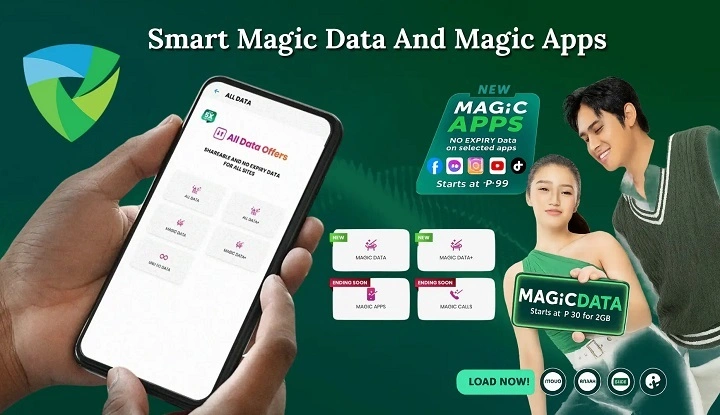
Registering Magic Data Smart is one of the easiest ways to get flexible, no-expiry mobile data on your Smart Prepaid or TNT line. Instead of watching your data disappear after a set number of days, Magic Data lets it stay in your account until you use it up. This makes it perfect for anyone who hates strict validity periods, wants backup data, or uses the internet only occasionally.
Whether you’re new to Magic Data or just want a clear walkthrough on how to register it the right way, this guide breaks down all the working methods step by step. We cover the simplest options, how to register through apps, USSD codes, retailers, and digital wallets, and even how to confirm your subscription so you use Magic Data without any stress.
What Is Magic Data Smart?

Magic Data Smart is a no-expiry mobile data promo offered by Smart Communications and TNT. It gives you a fixed amount of data that stays active in your account until fully consumed. There is no fixed validity period like 7 days or 30 days — your Magic Data only ends when your balance reaches zero.
This “use it when you want” design makes Magic Data a practical choice for light to moderate users who do not want to reload frequently or rush through their data.
Why Knowing How to Register Matters
What works for one person might not suit another when signing up for Magic Data. For some, using an app feels natural. A quick code through USSD pulls others in. Then there are those who walk down the street to a local shop instead. Each path gets you registered – just choose what fits how you move through your day.
Here’s how you can register Magic Data Smart in 2025.
Register Magic Data Smart via GigaLife App
The GigaLife App is the easiest and most user-friendly method for most users. It shows you all available Magic Data bundles, lets you compare them, and confirms your subscription instantly.
To register using the GigaLife App:
- Open the GigaLife App on your phone
• Sign in with your Smart or TNT number
• On the home screen, tap Magic Data
• Browse the list of Magic Data promos
• Select the Magic Data bundle you want (e.g., Magic Data 99, 199, 399, 499)
• Tap Subscribe
• Wait for the confirmation SMS
Once confirmed, your Magic Data will be added to your balance.
This method works best when you already have mobile data or Wi-Fi.
Register Magic Data Smart via USSD (*123#)
If you do not have mobile data or prefer USSD codes, registering via *123# is a quick alternative. This works on any phone that can dial numbers.
To register using *123#:
- Dial *123# on your phone
• Choose Promos & Offers
• Select Magic Data
• Choose the Magic Data promo you want
• Confirm the subscription
Wait for the confirmation SMS before using your Magic Data.
This method is great when you don’t want to use an app or do not have internet access.
Register Magic Data Smart via Retailer
If you prefer face-to-face transactions or need help from someone at the store, you can register Magic Data through a retailer.
To register via retailer:
- Visit a Smart or TNT retailer or sari-sari store
• Tell the seller you want to load Magic Data Smart
• Provide your mobile number
• Pay the required load (e.g., ₱99, ₱199, ₱399, ₱499)
• Wait for the SMS confirmation
This method is helpful if you want assistance or don’t want to register data promos yourself.
Also Read: TNT Magic Data No Expiry
Register Magic Data Smart via GCash
GCash is one of the fastest and most convenient ways to register Magic Data — especially if you already use it for mobile load and bills.
To register using GCash:
- Open the GCash App
• Tap Buy Load
• Choose Smart / TNT
• Scroll to find Magic Data options
• Select the promo you want
• Pay and confirm
You will receive an SMS confirmation once your Magic Data has been activated.
Digital wallet loading is quick, cashless, and ideal for users who prefer online payments.
Register Magic Data Smart via Maya
Maya (formerly PayMaya) also supports Magic Data loading, similar to GCash.
To register via Maya:
- Open the Maya App
• Tap Buy Load
• Choose Smart / TNT
• Select a Magic Data promo
• Complete the payment
• Wait for confirmation SMS
This method is convenient if you already use Maya for digital payments.
How to Confirm Your Magic Data Smart Subscription
After registration, you will receive an SMS confirming your Magic Data subscription. It usually includes:
- The name of the promo
• The amount of data loaded
• The fact that the data does not expire
• Your updated data balance
If you do not receive a confirmation message after a few minutes, try these steps:
- Restart your phone
• Ensure you have sufficient load
• Retry the registration
• Check if your SIM is Smart or TNT
• Contact Smart help or retailer support
Confirmation ensures your data is active and ready for use.
How to Check Your Magic Data Balance
After registering, knowing your balance helps you plan usage.
Here are the best ways to check:
- Open GigaLife App for real-time balance
• Dial *123# and choose balance inquiry
• Dial *121# (alternate USSD method)
• Watch for Smart/TNT SMS notifications
The GigaLife App not only shows your balance but also displays promo details and expiration info if any.
Who Should Use Magic Data Smart
Magic Data Smart is ideal for users who:
- Dislike expiring data
• Use data irregularly
• Rely mainly on WiFi and need occasional mobile data
• Want data as backup or emergency use
• Prefer flexible, long-lasting promos over short ones
If you use large amounts of data every day, traditional promos might still be better for daily heavy use. But for most casual to moderate users, Magic Data Smart offers real value.
Common Mistakes to Avoid When Registering

Here are a few things that often confuse users:
- Not having enough load before registration — always ensure you have the required amount
• Selecting the wrong promo — double-check before confirmation
• Not waiting for SMS confirmation — some users start using data immediately without confirming it was successful
• Using old USSD sequences — always use the latest codes from Smart
Avoiding these mistakes makes registration smoother.
Tips for Better Magic Data Usage
Magic Data is flexible, but a few habits help you get more value:
- Turn off auto-play videos on social apps
• Use WiFi when available for heavy downloads
• Check balance regularly via the app
• Avoid background data usage for apps that don’t need it
• Use data monitoring tools or phone settings to track usage
These habits help your Magic Data last longer.
Magic Data Smart Registration FAQs
How do I register Magic Data Smart ?
You can register Magic Data Smart via GigaLife App, *123#, retailer, GCash, or Maya.
Do I need internet to register Magic Data via 123# ?
No, you do not need internet to register Magic Data using *123#.
Can TNT users register Magic Data the same way ?
Yes, TNT users can also register Magic Data Smart with the same methods.
What if I don’t receive confirmation SMS ?
If you don’t receive confirmation, try restarting your phone, checking your load, or retrying the registration.
Can I register multiple Magic Data promos ?
Yes, you can register more than one Magic Data promo and the data balances will stack.
Does Magic Data have expiry ?
Magic Data does not expire until the data is fully consumed.
Can I register Magic Data through digital wallets ?
Yes, you can register Magic Data through GCash, Maya, and similar e-wallets.
Final Thoughts
Getting started with Magic Data Smart feels smooth, almost like flipping a switch. No need to rush or figure out complicated steps – just pick how you’d rather sign up. Through the GigaLife App, it flows without hiccups. Tap 123 on your phone if that suits you better. Walk into a store near you when offline works best. Even topping up via GCash or Maya slips right into daily routines. Everything built around real-life pace, not deadlines breathing down your neck.
Starting right means keeping more of what you pay for when using mobile internet. What makes Magic Data Smart stand out now isn’t just speed – it’s how easily users stay in charge.