
One moment you’re minding your own business, next – 632 flashes on screen. Not quite a full phone number, more of a tease. Pops up outta nowhere for some folks. Texts arrive tagged with it, quiet-like. Registration confirmations carry that tag too. Balance checks? Yep, seen it there. Even tinkering with those star-hash codes brings it around. So the mind does what minds do – it asks, straight up: who owns 632?
Every day in 2025, people using Smart or TNT prepaid plans see 632 show up. This number appears for real reasons. Scam? Not automatically. Another company hiding behind a name? Nope. Because what looks strange often has a plain explanation – this is one of those times.
Here’s how 632 works. Belonging to a specific carrier, it shows up under certain conditions. When your phone displays it, that signal carries meaning – no mystery, just facts. Load changes? Data shifts? Those stay untouched by this code. Seeing it doesn’t demand action, yet knowing helps. Calm words, clear points – that approach stays unchanged from earlier guides on codes like this one.
What Network Is 632?
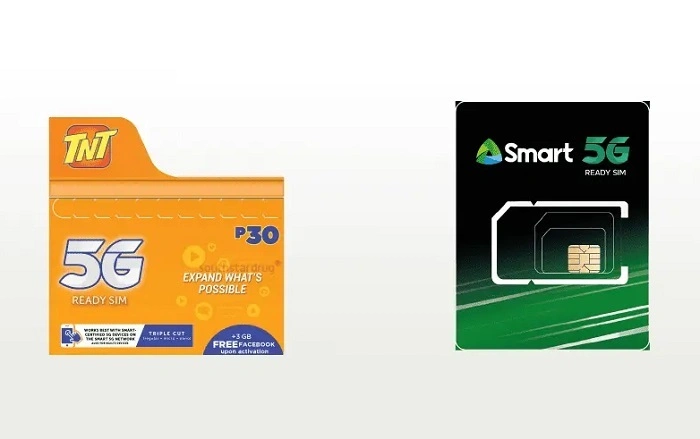
One carrier tied to 632 happens to be Smart Communications, operating prepaid lines like TNT – short for Talk ’N Text. Their network supports that number range across everyday mobile plans.
Not its own cell network, nor linked to outside providers. This number? A shortcut tool – Smart and TNT rely on it to push automatic updates to users. Messages about services arrive through this path.
Finding 632 on your screen? That’s usual with a Smart or TNT SIM. It shows up when the network checks your connection status.
What Kind of Number Is 632?
632 is a short service code, not a personal phone number. Telecom providers use short codes to communicate quickly and securely with subscriber SIM cards. These codes are designed for system use, not for calling or texting like a regular number.
Short codes like 632 are commonly used for:
- Promo confirmations
• Balance and data notifications
• System updates
• Network service alerts
• Automated account messages
They exist so the network can talk to your SIM without using full phone numbers.
Why Does 632 Appear on Your Phone?
Before listing reasons, it helps to understand one thing. The network constantly exchanges small signals with your SIM to keep your account updated. Sometimes, these signals appear as visible messages.
You may see 632 when:
- You register a promo such as Magic Data
• You check your load or data balance
• You receive a service confirmation SMS
• The network updates your account status
• You use USSD codes like *123# or *121#
• Your phone reconnects to the network after restart
In most cases, 632 appears together with a message, and that message is what matters.
What Does a Message From 632 Usually Mean?
Messages from 632 are usually informational, not instructional. They tell you something that already happened or is currently active on your account.
A typical message might confirm:
- A promo has been successfully registered
• Your remaining data balance
• Your load balance
• A service reminder or update
The short code 632 is just the sender ID. The actual message content explains what’s going on.
Also Read: 0036 What Network?
Does 632 Mean You Were Charged?
No.
Seeing 632 does not automatically mean that load or data was deducted.
Charges only happen when you:
- Register a promo
• Make a call or send an SMS
• Use mobile data
The presence of 632 alone does nothing to your balance. Always read the message content to understand if a transaction occurred.
Is 632 Safe?
Yes.
632 is considered safe and legitimate when it appears in connection with Smart or TNT services. It is part of the network’s official messaging system.
That said, always follow basic safety habits:
- Official messages do not ask for PINs or passwords
• They do not request personal details
• They usually do not include suspicious links
If a message claiming to be from 632 asks for sensitive information, treat it with caution and verify through official channels.
Can You Call or Reply to 632?
No.
632 is not a callable number and not designed to receive replies. Trying to call or text it will not give you customer support or useful results.
If you need help, the proper options are:
- The GigaLife App
• Dialing official Smart or TNT support codes
• Visiting a Smart or TNT store
Does 632 Belong to Other Networks?
No.
632 is not associated with Globe, DITO, or foreign networks. It is used internally by Smart and TNT systems.
If you are using a Smart or TNT SIM, that explains why you are seeing it.
Should You Block 632?
Blocking 632 is not recommended.
Messages from this short code may include important updates such as:
- Promo confirmations
• Data balance notifications
• Service advisories
• Network-related alerts
Blocking it could cause you to miss useful information about your account.
How 632 Is Related to Promos Like Magic Data
Many users first notice 632 after registering promos like Magic Data, All Data, or similar Smart/TNT offers. This happens because the network sends automated confirmations using system short codes.
If you recently loaded or checked a promo and then saw 632, that is expected behavior. The code itself is not the promo. It is simply how the network sends the message.
Common Misunderstandings About 632
Some worries come up repeatedly when users see short codes like this. Let’s clear them up.
632 is not hacking your phone.
632 does not mean your SIM is compromised.
632 does not activate services on its own.
632 does not deduct load by itself.
It is just part of how the network communicates with your SIM.
What You Should Focus On Instead
When you see 632, don’t focus on the number. Focus on the message content that comes with it.
Look for details like:
- Promo name
• Data amount
• Load balance
• Validity or no-expiry status
Those details tell you what actually matters.
What To Do If You’re Still Unsure
If a message from 632 leaves you uncertain, you can easily confirm your account status.
Helpful steps include:
- Checking your balance in the GigaLife App
• Dialing *123# or *121#
• Visiting a Smart or TNT store
• Contacting official customer support
These steps give you accurate confirmation without guessing.
Why Short Codes Exist at All
Short codes like 632 exist because they are efficient. They allow networks to send system-level messages quickly, securely, and consistently across millions of subscribers.
They are not meant to be user-friendly phone numbers. They are meant to work quietly in the background.
Frequently Asked Questions (FAQs) About 632 What Network
What network is 632 ?
632 is a system short code used by Smart Communications and TNT.
Is 632 a real mobile number ?
No, it is a network short code, not a personal phone number.
Does receiving a message from 632 cost money ?
No, receiving messages from 632 does not deduct load or data.
Can I reply to or call 632 ?
No, 632 is not designed for calls or replies.
Is 632 a scam number ?
No, messages from 632 are legitimate when they relate to Smart or TNT services and do not ask for sensitive information.
Why does 632 appear after loading a promo ?
Because Smart/TNT uses short codes like 632 to send automated confirmations and updates.
Should I block 632 ?
No, blocking it may prevent you from receiving important service messages.
Final Thoughts
Getting 632 might seem odd when you look at your screen, particularly if you’re waiting for a regular call. Yet nothing risky happens here. This combo pops up because Smart and TNT set it aside for alerts tied to your account. Messages arrive through this channel without needing a full number.
Most times when you see 632, it’s simply how Smart or TNT systems send alerts. Look at what the text says instead of focusing on digits. The meaning matters more than where it came from. Behind the scenes, signals move without noise. Quiet work needs no attention.