
If your Smart SIM was locked due to a wrong PIN, a PUK code is required to unlock your SIM. Most Smart users tend to lock their phones due to a forgotten Smart SIM PIN or an occurrence of an incorrect PIN screen. Additionally, the information provided below will enlighten readers on everything they need to know about the PUK code. It covers why Smart SIM gets locked, unlocking Smart SIM, and getting Smart PUK code.
What Is a Smart PUK Code
A PUK code or Personal Unblocking Key is a code used to unlock a SIM from an incorrect PIN. The code is vital for the security of your Smart SIM card.
PUK codes are significant for several reasons.
They prevent people who do not know the PIN of a Smart SIM card from guessing.
Why Does Your Sim Ask for a PUK Code?
Your Smart SIM card asks for a PUK code when there is a consecutive failure of a Smart SIM PIN attempt or guessing PIN attempts. Additionally, other reasons why Smart SIM asks for a PUK code are:
A Smart SIM PIN was forgotten
Guessing or repeated wrong attempts of a Smart SIM PIN.
Trying to guess the PIN of a Smart SIM card.
Turning on the SIM PIN option accidentally.
If a Smart SIM card asks for a PUK code. Then it is essential to get a PUK code to unlock the SIM.
How to Get Your Smart PUK Code
Getting a Smart PUK code is not as easy as it seems. However, there are a few ways that one can get a Smart PUK code if a SIM card asks for it. They are:
Contact Smart Customer Service
Contacting Smart customer service is the best option to get a Smart PUK code if you are the primary user or owner of the SIM card.
Go to an Official Smart Store
Going to an official Smart store is another reliable option to get a Smart PUK code. At the official store, a customer service agent can unlock your SIM. To unlock a SIM card, the agent may ask to provide a government-issued ID and Smart contact number.
Check Your old SIM Card Packaging
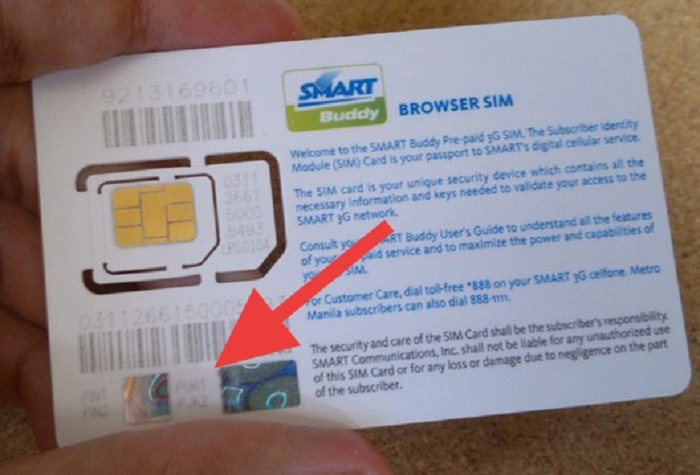
Another option of getting a Smart PUK code is by checking your old Smart SIM card packaging. Usually, the code is printed on the package. However, if it is not available, one can contact Smart customer service. They will provide the SIM details to get the code.
Also Read: All Data Smart
How to Unlock Your Smart SIM
The following guide provides information about how to unlock a Smart SIM using a Smart PUK code.
The First Step
Enter the correct PUK code that was obtained when prompted to do so.
The Second Step
Set a new PIN for the Smart SIM card.
The Third Step
Re-enter the new PIN to complete the unlocking process. Once the Smart SIM card is unlocked, it is essential to set a strong and reliable PIN. So it cannot be easily guessed.
What Should I Do If I Enter the Wrong PUK Code?
One should not try to guess a PUK code again if they have entered the wrong code because incorrect attempts when guessing a PUK code may result in a permanent SIM lock. A permanent SIM lock necessitates the installation of a new SIM card.
However, if a Smart SIM is permanently blocked, one can retain their number. They can do it by contacting Smart customer service and asking them to unlock the SIM.
Some Ways to Avoid Getting Locked Out of Your Smart SIM
The following are some of the ways that one can avoid getting locked out of a Smart SIM.
Remembering a Smart SIM PIN and keeping the code confidential.
Avoiding multiple attempts of guessing or finding a Smart SIM PIN.
Not removing a Smart card if the SIM PIN was forgotten or cannot be remembered
Keeping the Smart SIM packaging away from children and unauthorized users.
Contact Smart customer service if one cannot remember a Smart SIM PIN.
Following the above smart ways of avoiding getting locked out of a Smart SIM can be reliable and save time.
FAQ’s About Smart Puk Code
Can I guess my PUK code?
It is not advisable to guess a PUK code because it may lead to having a Smart SIM permanently blocked.
Can I keep my number if my Smart SIM is permanently blocked?
A person can keep their number if a permanent block occurs on their Smart SIM. To do this, it is important to contact Smart customer service and get the exact details of unlocking the Smart SIM.