

Upgrading your Smart SIM to a 5G ready SIM is an incredibly convenient option that lets you enjoy faster data speeds and lower latency which means better overall cellular network performance. If you happen to have a 5G smartphone plus good Smart coverage upgrading to a 5G ready SIM is the next best thing you can do for your cellular network connection Lucky for you, upgrading your Smart SIM is super simple as most Smart Stores can do it for you by simply replacing your old SIM with a new one while keeping your mobile number.
You will learn everything there is to know about how to upgrade your Smart SIM including the requirements and activation steps.
Why Upgrade Your Smart SIM to 5G
Upgrading your SIM ensures that you can enjoy the latest cellular network offerings that Smart can provide.
Here are just some of the benefits of using a 5G SIM card:
- Faster mobile data speeds
- Lower latency
- Better performance for streaming and gaming
- Faster download and upload speeds
- Overall better cellular network performance
- Future proofing your smartphone
Keep in mind that you can only enjoy all of the aforementioned benefits if you are using a 5G SIM in a good network coverage.
Requirements Before Upgrading
Before we discuss how to actually upgrade your Smart SIM let us first discuss the requirements that you must fulfill before you can do so.
- Current Smart SIM
- 5G Ready smartphone
- Government issued ID
- Existing Smart mobile number
- Access to a Smart Store
You can retain your mobile number upon upgrading your SIM.
How to Upgrade Your Smart SIM to 5G
Now that you already know why and when to upgrade your Smart SIM to 5G let us now discuss how you can actually do it.
Step 1: Go to a Smart Store
The very first thing that you have to do in order to upgrade your Smart SIM is to go to the nearest Smart Store or authorized retailer that offers SIM replacement services.
Step 2: Ask to Upgrade Your Smart SIM
Speak with the officers at Smart Stores. Ask them whether you can upgrade your existing SIM to a 5G one.
Step 3: Show Your Identification
Show your identification to the officer in charge and complete the necessary steps to facilitate your request.
Step 4: Get Your New SIM
After your request has been approved, get your new 5G ready SIM from the officer handling your case.
Step 5: Insert the New SIM to Your Smartphone
Turn off your smartphone. Insert the new 5G SIM card that you got from the Smart Store. Make sure that you remove your old card. Then replace it with the new one.
Step 6: Wait for Activation
The new card that you inserted into your smartphone requires some time to activate. Once your new one has activated you can simply reboot your smartphone if necessary.
How to Check If Your SIM Is Already 5G Ready
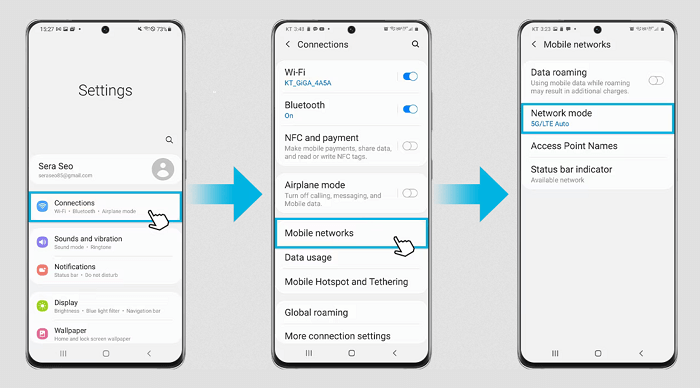
If you are not sure whether your existing Smart SIM is already 5G Ready or not then you have a few options.
- Talk to Smart about it
- Ask at a Smart Store
- Test your existing SIM card in a 5G Ready smartphone while being in a good network coverage
Most of the time new Smart LTE SIM cards are already 5G ready so there is no need to replace them.
Why Isn’t 5G Working After the Upgrade?
There can be several reasons why 5G isn’t working after you upgraded your SIM. Here are the most common reasons:
- Your smartphone is not 5G Ready
- Your smartphone’s 5G setting is turned off
- You are not in a 5G network coverage
- Your new SIM has not been activated
- Your smartphone needs an update
- There is an ongoing cellular network maintenance
Most of the time simply turning your smartphone off and then back on again after your new SIM has been activated fixes most issues.
Tips Before Upgrading Your Smart SIM
There are also other things that you need to consider before actually going through with your decision to upgrade your Smart SIM. Here are some of the best tips that you can follow before upgrading your SIM:
- Backing up your contacts especially if they are saved in your SIM
- Bringing a government issued ID
- Charging your smartphone
- Updating your smartphone
- Ensuring that your smartphone is compatible with Smart’s 5G network
These are just some of the best things to do before you decide to upgrade it to a 5G ready one. By following these tips, you can make the whole process smoother.
FAQs
Is every Smart SIM 5G-ready?
Not every Smart SIM is compatible with 5G networks. If you have an old SIM then Smart might ask you to replace it with a newer one.
Can I still use LTE with a 5G SIM?
You can keep using LTE networks if 5G cellular networks are not available.
Upgrading your Smart SIM to 5G is a convenient option. It lets you future proof your smartphone while ensuring that you can enjoy a better cellular network connection than before. Just make sure that you follow all of the steps to make the process as smooth as possible. Remember that you should only upgrade your Smart SIM if you have a 5G smartphone and if you are in a good coverage area in terms of Smart’s 5G cellular network in order to actually enjoy the benefits that come with it.