
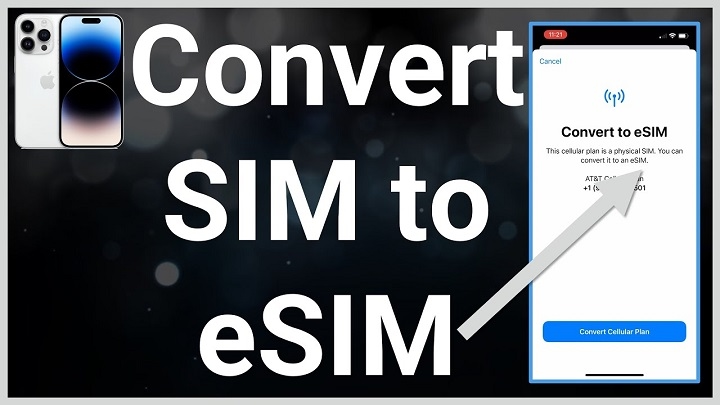
Remember those tiny plastic SIM cards? The ones you’d lose or scratch? Well, things have changed big time. More folks are going from old SIM cards to eSIM tech now. Lots of people still feel lost about it. Some think eSIM is hard to use. Others worry they’ll need a new phone number. And many fear losing their stuff when they switch. But here’s the good news. Moving from plastic SIM to eSIM is way easier now. Most phone companies let you do it through their apps. Or with QR codes. Or at their stores. Or online. The best part? You keep your same number most times. That’s why so many people are making the switch. Let me show you how it all works.
What Is an eSIM?
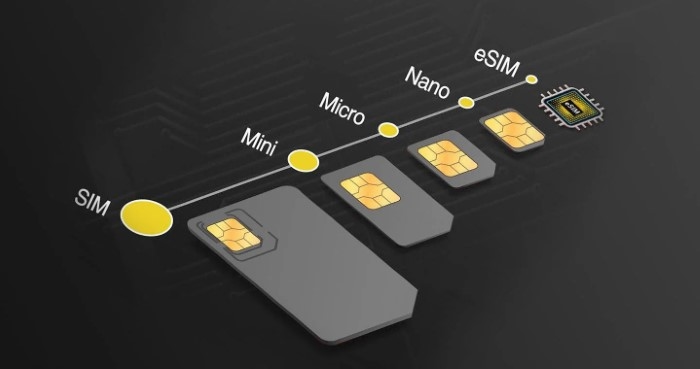
Think of eSIM as a SIM card that lives inside your phone. No plastic needed. Your phone company turns on your service online. That tiny tray? Gone. The eSIM works just like the old SIM cards did. You can still make calls. Send texts. Use data. Get those bank codes. Check your apps. Everything works the same. The only change? It’s all digital now.
Why People Are Switching to eSIM
eSIM got really popular lately. Here’s why.
No Physical SIM Needed
No more tiny cards to carry around. Or lose.
Easier Network Switching
Want a new carrier? Switch in minutes. Not days.
Better for Travel
Going abroad? Buy local data online. Turn it on right away. No hunting for SIM shops.
Dual SIM Convenience
Many phones now let you use one plastic SIM plus one eSIM. Or even multiple eSIMs.
Less Risk of SIM Damage
No plastic means no scratches. No bent cards. No broken trays.
Phones That Support eSIM
Not all phones have eSIM yet. But lots do now. Like newer iPhones. Samsung Galaxy phones. Google Pixels. Most fancy Android phones too. Always check your phone first. Make sure it works with eSIM.
Can You Keep the Same Number?
Yes! Most times you can. This is what everyone asks first. And it’s good news. Most carriers move your number right over. So you won’t lose your contacts. Or your bank access. Or those login codes. Everything stays the same.
Before You Start the Conversion
Let’s do some quick checks first.
Make Sure Your Phone Supports eSIM
This one’s super important. Check first!
Update Your Phone Software
Old software can mess things up. Update it.
Ensure Stable Internet Access
You’ll need good Wi-Fi or data. The setup needs it.
Backup Important Data
Just to be safe. You know?
How to Convert Physical SIM to eSIM
The steps change based on your carrier. And your phone. But most work pretty much the same way.
Method 1: Convert Using Carrier App
Lots of phone companies have apps now. They make eSIM setup easy. Here’s how it usually goes. Open your carrier’s app. Sign in to your account. Find the SIM settings part. Pick “convert to eSIM” or something like that. Prove who you are. Then follow what it says. Super common in 2026. And super easy too.
Method 2: Scan a QR Code
Many carriers use QR codes now. Those square barcode things.
They give you a QR code. Plus setup steps. Sometimes a special code too.
Then you go to phone settings. Find mobile network stuff. Add an eSIM. Scan that QR code.
Your phone does the rest. Downloads everything it needs.
Method 3: Visit a Telecom Store
Some folks like to help in person. Nothing wrong with that!
Great for older users. Or work accounts. Or tricky number moves.
Just bring your phone. Your ID. And your old SIM card.
The store people do everything. Easy!
Method 4: Carrier Website Activation
Some companies let you do it online too. You might need to log in. Prove who you are. Download a QR code. Then set it up.
What Happens to the Physical SIM?
Your old plastic SIM stops working. The carrier turns it off. This stops problems. Only one SIM works at a time.
How Long Does Conversion Take?
Sometimes just a few minutes! Other times it takes hours. Maybe a whole day. Busy times take longer.
Why eSIM Activation Sometimes Fails
Things can go wrong. Here’s why.
Unsupported Phone
Some phones just can’t do eSIM. Check yours first.
Weak Internet Connection
eSIM needs a good internet. Bad Wi-Fi? It might fail.
Carrier Compatibility Issues
Not all carriers have eSIM yet. Some still use plastic only.
Incomplete Verification
Maybe your ID photo was blurry. Or account info was wrong. Or the check failed somehow.
QR Code Expired
Some QR codes only work for a bit. Then they stop.
Can You Switch Back to Physical SIM Later?
Usually yes! Most carriers let you go back if needed. But check their rules first. Each one’s different.
Is eSIM Safe?
Yes! Really safe actually. Modern eSIM has strong security. Like carrier checks. Encrypted setup. Account safety stuff.
What Happens If You Change Phones?
You’ll need to move the eSIM again. Some carriers let you transfer it easy. Others give you a new QR code.
eSIM and Mobile Banking
This matters a lot now. Phone numbers connect to everything! Like banking apps. Those SMS codes. Digital wallets. Login checks. That’s why carriers check who you are extra careful. They want to keep your stuff safe.
Why Travelers Love eSIM
Travel got so much easier! No more hunting for SIM shops abroad. Now you can buy data plans online. Turn them on right away. Switch carriers are easy. No tiny SIM cards to swap. Nice!
Can You Use Multiple eSIMs?
Lots of new phones support multiple eSIMs. But usually only one or two work at once.
Common Mistakes People Make
Here’s what goes wrong sometimes.
Deleting the eSIM Too Early
Some folks remove stuff before setup finishes. Don’t do that!
Ignoring Carrier Instructions
The steps matter. Follow them!
Using Expired QR Codes
Old codes won’t work. Get fresh ones.
Not Backing Up Important Data
Always smart to save your stuff first.
How to Avoid eSIM Problems
Some easy tips help a lot.
Use Official Carrier Apps
Way safer than random apps.
Keep Stable Wi-Fi During Setup
Bad internet can mess up setup.
Double-Check Device Compatibility
Super important! Check first.
Save Your QR Code Temporarily
Helps if you need to try again.
Why eSIM Is Growing So Fast
eSIM fixes lots of old SIM problems. No more damaged cards. Lost trays. Physical swapping. Tiny plastic bits. And phone companies keep making it better. Every year gets easier.
Quick Summary Table
| Feature | eSIM Benefit |
| No physical card | All digital setup |
| Keep same number | Usually yes |
| QR activation | Fast setup |
| Travel friendly | Very easy |
| Dual SIM support | Simple to manage |
| Safer activation | ID checks |
FAQs
Can I convert my physical SIM to eSIM?
Usually yes! If your carrier and phone support it.
Will I lose my phone number?
Nope! You keep it most of the time.
Do all phones support eSIM?
No. Only some models do.
Is eSIM activation free?
Depends on your carrier. Ask them.
Can I switch back to a physical SIM later?
Usually yes. Check with your carrier.
Does eSIM work for banking apps?
Yes! Works great.
Can I use multiple eSIM profiles?
Many phones support that now.
Is eSIM safer than physical SIM?
In many ways, yes! Better security.
Switching from plastic SIM to eSIM got way easier than people think. What seemed super futuristic before? Pretty normal in 2026 now. Maybe you want easier travel. Or a cleaner phone setup. Or dual SIM stuff. Or just less plastic card hassle. Or faster carrier switching. eSIM gives you all that. And more! The best part? Most phone companies make it simple now. Regular people can do it. No tech skills needed.