
So your SIM card just gave up on you? Yeah, that’s one of those problems that instantly ruins your mood.
One second everything works normally.
Then suddenly:
- no signal
- no internet
- calls fail
- texts stop sending
- weird SIM errors appear
And honestly?
Most people immediately think their whole phone is broken.
But most times?
The problem isn’t nearly that serious.
In 2026, SIM cards still cause random issues even with modern smartphones and faster networks.
And since our phone numbers now connect to almost everything:
- banking apps
- OTP codes
- social media
- online shopping
- digital wallets
- work logins
- recovery systems
…a dead SIM card feels like losing access to half your digital life.
The good news?
A lot of SIM issues are surprisingly fixable.
Sometimes it’s just a network problem. Other times the SIM shifted slightly. Sometimes your carrier is having trouble.
Let’s break down the biggest reasons SIM cards stop working and what people usually do to fix them.
What Happens When a SIM Card Stops Working?
When a SIM card fails properly, your phone loses access to:
- mobile calls
- text messaging
- internet data
- network authentication
- carrier services
Basically your phone can’t connect to your mobile provider anymore.
Common Signs Your SIM Card Isn’t Working
Most people notice stuff like:
- “No SIM card detected”
- “No service”
- “Emergency calls only”
- missing signal bars
- failed calls
- no internet access
- delayed OTP messages
Sometimes the problem appears instantly.
Other times the signal slowly gets worse over time.
Why SIM Cards Stop Working
There are actually lots of possible reasons.
Some are tiny. Some are more serious.
Weak Network Coverage
Honestly?
This is one of the biggest reasons.
Your phone may simply be in an area with poor signal.
Common weak-signal locations include:
- elevators
- underground parking
- rural zones
- tunnels
- thick concrete buildings
Temporary Carrier Outages
Sometimes the carrier itself has problems.
This can happen because of:
- tower maintenance
- network overload
- damaged infrastructure
- software upgrades
If nearby users also lose service, it’s likely a carrier outage.
SIM Card Shifted Inside the Phone
Even tiny movements matter.
Dropping the phone can slightly loosen the SIM card.
Then the connection becomes unstable.
Also Read: Seeing “SIM 1 Not Provisioned
Dirty SIM Contacts
The metal chip on SIM cards gets dirty over time from:
- dust
- skin oils
- pocket lint
- moisture
This weakens the phone connection.
SIM Card Damage
SIM cards physically wear out eventually.
Especially older ones.
Damage may include:
- scratches
- bent corners
- cracked chips
- water exposure
SIM Registration Problems
Many countries now require verified SIM registration.
If registration fails because of:
- incorrect ID details
- incomplete signup
- failed verification
…the SIM may stop working completely.
Inactive Prepaid SIM
Prepaid users see this a lot.
Some carriers deactivate unused SIMs after long inactivity.
Usually if users stop:
- reloading credit
- calling
- texting
for several months.
Phone Software Bugs
Phones sometimes create SIM problems after:
- software updates
- failed updates
- beta installs
- crashes
Airplane Mode Glitches
Sounds funny, but it happens constantly.
Phones sometimes get partially stuck in airplane mode after glitches.
SIM Tray Damage
SIM trays can bend or crack.
Especially when users:
- force them open
- insert wrong SIM sizes
- use cheap adapters
Carrier-Locked Phones
Some devices only work with specific networks.
This is called carrier locking.
Other SIMs simply won’t function.
eSIM Problems
eSIM users also experience failures sometimes.
Common eSIM issues include:
- failed activation
- QR code errors
- deleted profiles
- network syncing problems
First Things You Should Try
Before spending money, try these easy fixes first.
Restart Your Phone
Seriously.
This fixes tons of temporary network bugs.
Turn the phone fully off.
Wait about 10 seconds.
Then restart it.
Toggle Airplane Mode
Turn airplane mode on for around 30 seconds.
Then switch it off.
This forces the phone to reconnect to networks.
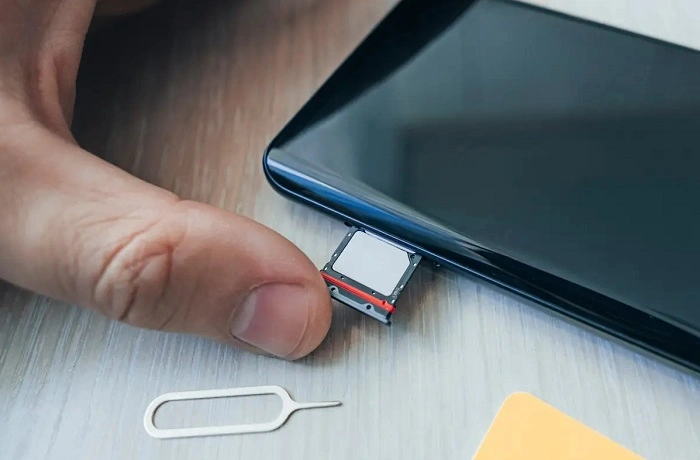
Remove and Reinsert the SIM
Take out the SIM tray carefully.
Inspect for:
- dirt
- scratches
- moisture
- incorrect placement
Then put it back correctly.
Clean the SIM Carefully
Use only:
- a soft dry cloth
- gentle pressure
Never use liquids.
Try Another SIM in Your Phone
Very useful test.
If another SIM works, your original SIM may be damaged.
Test Your SIM in Another Phone
This helps identify if:
- the phone is faulty
- or the SIM itself failed
Update Your Phone Software
Outdated software sometimes causes network communication issues.
Reset Network Settings
Most phones now allow users to reset:
- mobile settings
- carrier settings
- Wi-Fi settings
without deleting personal data.
Check Carrier Outages
Before panicking, check:
- carrier websites
- outage trackers
- local user reports
- social media complaints
Contact Your Carrier
If nothing works, contact your telecom provider.
They can check:
- activation status
- SIM registration
- network problems
- account suspension
- provisioning errors
SIM Replacement Might Be Needed
Sometimes SIM cards simply die completely.
Especially older ones.
Carriers usually offer replacement SIMs quickly now.
Can You Keep the Same Number?
Usually yes.
Most providers transfer your old number directly to the replacement SIM.
How Long SIM Replacement Takes
Often very fast now.
Usually:
- minutes in stores
- a few hours online
- one business day sometimes
Why SIM Problems Matter More Today
Years ago, broken SIMs mostly affected calls.
Now though?
Phone numbers connect to:
- banking systems
- identity verification
- account recovery
- work authentication
- digital wallets
That’s why SIM issues feel much more serious today.
Common SIM Error Messages
Different phones show different warnings.
Like:
- “Invalid SIM”
- “No SIM detected”
- “SIM failure”
- “Emergency calls only”
- “SIM not provisioned”
Most point toward network communication problems.
SIM Problems While Traveling
Travel often creates network issues because of:
- roaming restrictions
- unsupported carrier bands
- tourist SIM activation delays
Can Water Damage Cause SIM Failure?
Absolutely.
Even small moisture exposure can damage:
- SIM chips
- SIM trays
- phone SIM readers
Why Old SIM Cards Fail More Often
Older SIMs sometimes struggle with:
- modern 5G networks
- newer authentication systems
- updated carrier technologies
Common SIM Card Scams
Be careful while troubleshooting.
Scammers may send fake carrier messages asking users to:
- verify SIM details
- share OTP codes
- click fake links
Never share verification codes with random people.
Tips to Avoid Future SIM Problems
Some easy habits help a lot.
Keep SIM Cards Dry
Moisture ruins electronics quickly.
Avoid Cheap SIM Adapters
Bad adapters damage trays constantly.
Use Official Carrier SIMs
More reliable and secure.
Keep Carrier Apps Updated
Helpful for troubleshooting.
Don’t Ignore Registration Messages
Registration issues can disable SIMs later.
Can Factory Reset Fix SIM Problems?
Sometimes software-related issues improve.
But factory reset won’t fix:
- damaged SIM cards
- carrier outages
- activation failures
Quick Summary
| Problem | Possible Cause |
| No signal | Weak coverage |
| SIM not detected | Dirty or damaged SIM |
| Calls failing | Activation issue |
| Emergency calls only | Carrier or registration problem |
| eSIM failure | Setup error |
| Invalid SIM | Carrier lock or SIM damage |
| Prepaid SIM inactive | Long inactivity |
FAQs About Why Is My SIM Card Not Working
Why is my SIM card not working suddenly?
Usually network issues, SIM damage, software bugs, or carrier problems.
Can restarting the phone fix SIM problems?
Very often yes.
How can I tell if my SIM is damaged?
Test it on another phone.
Can old SIM cards stop working completely?
Absolutely.
Will I lose my number if my SIM breaks?
Usually no.
Can carriers replace damaged SIM cards?
Yes, very commonly.
Can eSIMs also fail?
Definitely.
Should I contact my carrier if basic fixes fail?
Yes, that’s usually the best next step.
Honestly, SIM card issues happen way more often than most people realize. The good thing though? Most cases are fixable without replacing your whole phone.
Whether the issue comes from:
- network outages
- SIM damage
- activation problems
- software bugs
- old prepaid accounts
- eSIM setup failures
…there’s usually a solution available.
The biggest thing is figuring out whether the problem comes from:
- your SIM card
- your phone
- or your carrier network
Once you narrow that down, fixing the problem becomes much easier.