
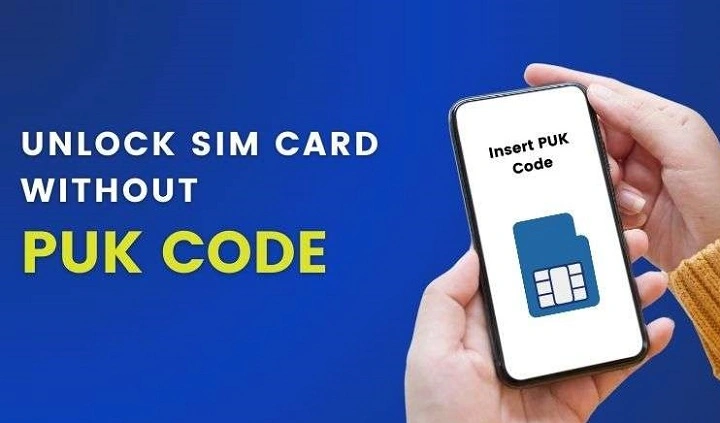
You pick up your phone. You type your SIM PIN. Wrong. You try again. Wrong again. One more try. Still wrong. Then your phone shows this weird message: “Enter PUK Code”Or maybe: “SIM Blocked” And now you’re like, what happened? Don’t worry. This happens. Tons of people see this PUK thing every day. They just typed the wrong PIN too many times. The message looks scary, right? But here’s the thing. Your SIM card is fine. Your phone is fine too. The network didn’t ban you or anything. Your SIM card is just being careful. That’s all. The good news? You can fix most PUK problems. You just need to know how. Let’s go through it step by step.
What Is a PUK Code?
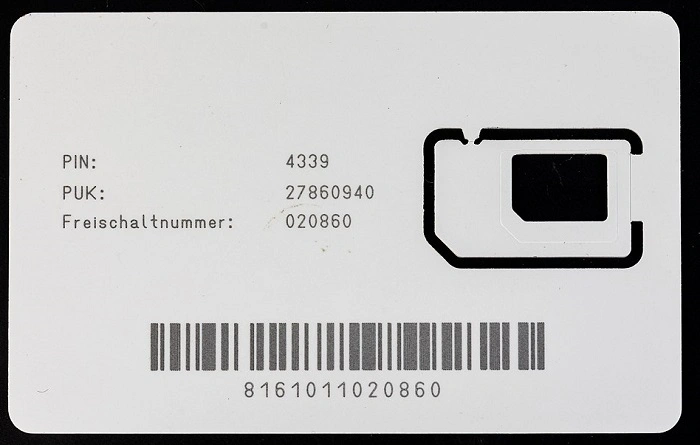
PUK means:
Personal Unlocking Key
It’s like a special code for your SIM card.
Its job is simple.
When someone types the wrong SIM PIN too many times, it locks up.
To unlock it, you need the right PUK code.
Think of it like this. It’s a spare key for your SIM card.
Why SIM Cards Use PUK Protection
Phone companies use PUK codes to keep you safe.
Picture this. Someone steals your phone.
Without this safety thing, they could:
- make calls
- send texts
- use your data
- get your text codes
- reset passwords
- get into your bank apps
The SIM PIN and PUK system helps stop all that bad stuff.
What Causes a SIM to Request a PUK Code?
The main reason? Typing the wrong SIM PIN too many times.
It goes like this:
- type wrong PIN
- type wrong PIN again
- type wrong PIN one more time
- SIM locks itself
- phone asks for PUK code
How many tries you get depends on your phone company.
What Happens When a SIM Is Blocked?
Once it’s blocked, it can’t:
- connect to the network
- send texts
- get calls
- use mobile data
- receive code texts
Your phone number basically stops working. Until you unlock the SIM, that is.
Is a PUK Code the Same as a SIM PIN?
Nope.
People mix them up a lot.
SIM PIN
A SIM PIN is:
- short
- used every day
- picked by you or your carrier
- typed when your phone starts
PUK Code
A PUK code is:
- longer
- rarely used
- made by your carrier
- only needed after you mess up the PIN
Also Read: Need a New SIM Card?
Where Can You Find Your PUK Code?
Most carriers give you the code in a few places.
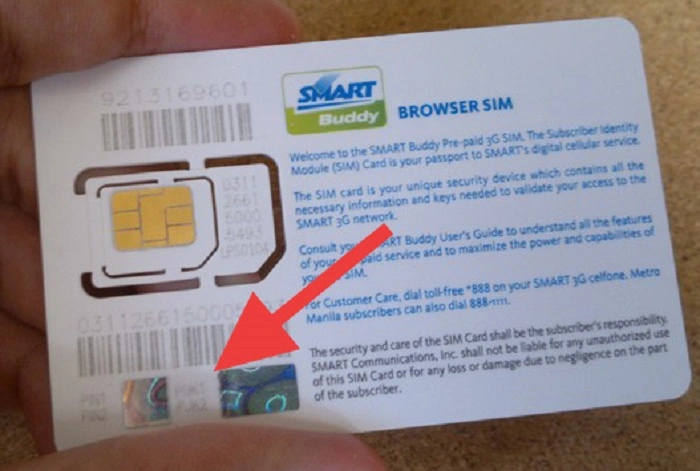
Original SIM Packaging
You know that plastic card your SIM came on?
That card often shows:
- SIM number
- PUK code
- setup info
That’s why you should keep the package. Smart move.
Carrier Mobile App
Many carriers show PUK info in their apps now.
After you log in, you might find:
- account info
- SIM details
- safety settings
- PUK code access
Carrier Website
Their website often has the same stuff.
Customer Support
Customer service can give you the code. They’ll just check who you are first.
What Should You Do First?
The most important thing?
Stop Guessing
I mean it.
Don’t keep typing random numbers.
Every wrong try makes things worse. You might block the SIM for good.
How to Unlock a SIM Using a PUK Code
It’s pretty easy actually.
Step 1
Type the right PUK code.
Step 2
Make a new SIM PIN.
Step 3
Type the new PIN again.
Step 4
Wait for the SIM to connect.
If the code works, your phone should work again.
What Happens If You Enter the Wrong Code?
This is where it gets serious.
Most SIM cards only let you try a few times.
Too many wrong tries can break the SIM forever.
When that happens:
- the SIM can’t be fixed
- the card is dead
- you need a new one
Can You Unlock a SIM Without the Code?
Sometimes you can.
But not with weird internet tricks or hacking tools.
Real options include:
- calling your carrier
- going to their store
- proving it’s your account
- getting a new SIM
Common Myths About PUK Codes
There’s lots of bad info online.
Myth: Any Website Can Generate My PUK
Nope. False.
Only your carrier has your PUK codes.
Myth: Factory Reset Removes SIM Locks
Wrong again.
A factory reset changes your phone. It doesn’t touch SIM safety stuff.
Myth: Airplane Mode Can Bypass PUK
Nah. False.
Airplane Mode can’t unlock a blocked SIM.
Myth: Free Online PUK Generators Work
Almost never true.
Most are scams. Stay away.
Why Carriers Protect PUK Codes
It’s all about safety.
Think about it. What if anyone could get your unlock code?
They could see:
- OTP messages (those are code texts)
- bank codes
- password resets
- account recovery stuff
That’s why carriers check who you are first.
Can eSIM Users Face Similar Problems?
Yep.
eSIM users can get locked out too.
To fix it, you might need:
- to prove who you are
- to log into your account
- to reset your digital profile
It’s different but the safety idea is the same.
What If Your SIM Is Permanently Blocked?
The SIM card might be dead. But you can often keep your number.
Most carriers let you:
- get a new SIM
- move your number
- fix your account
They just need to check it’s really you.
How SIM Replacement Works
When they say yes to a new SIM:
- the old SIM stops working
- you get a new SIM
- your number moves to the new card
Most people keep:
- their phone number
- account services
- carrier plan
Can You Keep Your Number?
Usually yes.
That’s why carriers check who you are so carefully.
They want to make sure the right person gets the new SIM.
Why PUK Issues Matter More Today
Years ago, losing a SIM just meant missed calls.
Today your number connects to:
- online banking
- digital wallets (like PayPal)
- social media
- email recovery
- work accounts
- login systems
That’s why SIM safety is way more important now.
Common Reasons
It happens more than you’d think.
New phones use:
- finger unlock
- face unlock
- device PINs
- passwords
Many people rarely type their SIM PIN anymore.
Then one day they need it. And poof, can’t remember.
Tips to Avoid PUK Problems
A few easy habits can help.
Save Your PUK Code
Put it somewhere safe.
Keep SIM Packaging
At least until you save the info.
Avoid Random PIN Guessing
If you’re not sure, stop right away.
Use Carrier Apps
They often have recovery tools.
Enable Strong Account Security
Keep your mobile account safe too.
SIM Security and Mobile Banking
Mobile banking makes SIM safety super important.
Phone numbers are used for:
- OTP delivery (text codes)
- login checks
- payment OKs
- password recovery
A hacked SIM can cause big problems.
Common PUK-Related Scams
Scammers love to target locked-out users.
Watch for messages saying they can:
- unlock any SIM
- make PUK codes instantly
- bypass carrier safety
Many try to steal:
- passwords
- bank details
- personal info
Always use official carrier channels. Always.
Quick Summary
| Problem | Solution |
| Forgot SIM PIN | Use PUK code |
| Lost PUK code | Contact carrier |
| SIM blocked | Verify ownership |
| Wrong PUK entered | Stop guessing |
| Permanently blocked SIM | Request replacement |
| Lost SIM packaging | Use app or support |
| eSIM lock issue | Contact carrier |
FAQs About Puk SIM Card
What does PUK stand for?
Personal Unlocking Key.
Can I unlock my SIM without a PUK code?
Sometimes through carrier checks or SIM replacement.
Can I get my PUK code online?
Usually through your carrier’s website or app.
Can customer support provide my PUK code?
Yes, after they check who you are.
Does factory reset remove SIM locks?
No.
Seeing a PUK code request can feel scary. I get it. Your phone number connects to so many important things. But a blocked SIM card isn’t the end of the world.
Most times, the fix is easy:
- find the PUK code
- prove it’s you
- unlock the SIM
- make a new PIN
And if the SIM dies forever? Carriers can often give you a new one. You keep your number too.
The most important thing is simple:
Don’t keep guessing.
Once that PUK screen shows up, use official carrier help. Follow the right steps. That’s how you get back online fast and safely.