
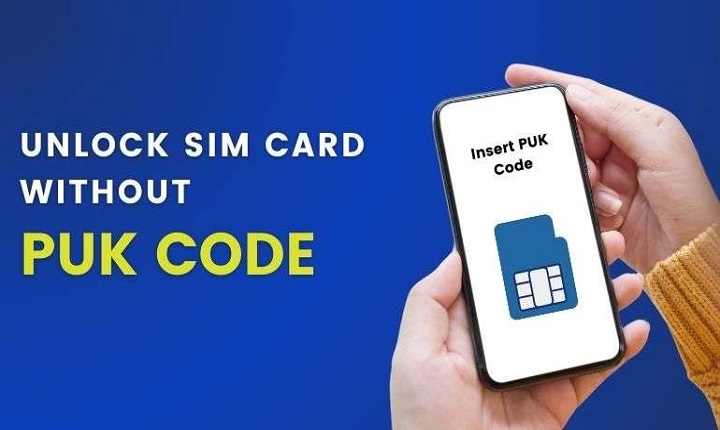
So your phone just shows this scary message:
- “SIM locked”
- “Enter PUK code”
- “SIM blocked”
And now you’re stuck. Really stuck. Yeah, this happens to tons of people. It usually starts simple. You type the wrong SIM PIN a few times. At first, you think: “No big deal. I’ll just try again.” Then boom. The SIM locks up totally. And wow, that gets scary fast.
Because your SIM card now links to:
- bank apps
- code texts (you know, those 6-digit ones)
- social media
- money apps
- work stuff
- chat apps
Losing your phone number? That’s a huge mess. The good news? People still find ways to get back in. Even without that PUK code thing. Some ways are official. Some depend on your phone company. And some only work sometimes. Let’s go through it all. Nice and safe.
What Is a PUK Code?
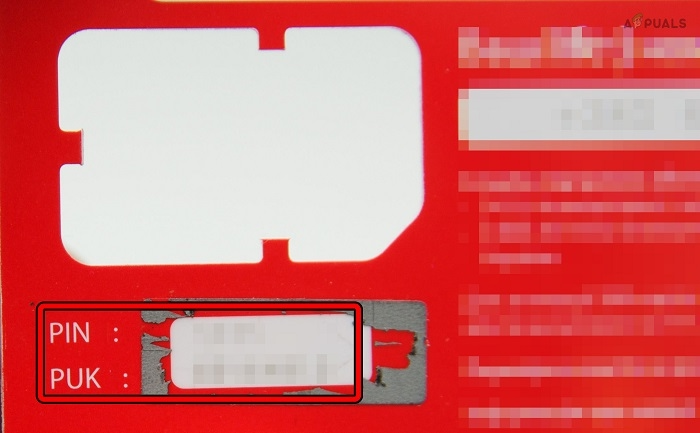
PUK means: Personal Unlocking Key. It’s like a rescue code. It saves your SIM when you mess up the PIN too much. Type the wrong SIM PIN too many times? The SIM blocks itself. Then your phone wants the PUK code.
Why SIM Cards Use PUK Protection
This keeps your SIM safe from bad guys.
If someone steals your phone, this system stops them from:
- making calls
- reading texts
- using your data
- stealing code texts
What Happens After Too Many Wrong PIN Attempts?
It goes like this:
- type wrong SIM PIN lots
- SIM locks up
- phone asks for PUK
- mess up PUK too much? SIM might die forever
That last bit? Super important.
Dead SIMs need replacing. No fix exists.
Can You Unlock a SIM Without the PUK Code?
Sometimes yes. Maybe.
But it depends.
The safe ways usually mean:
- calling your phone company
- using their apps
- finding old SIM packaging
- proving it’s yours
Those “SIM unlock hacks” online? Mostly fake. Or dangerous.
First Thing: Stop Guessing the PUK
Really. Stop now. This is so important. Most SIMs only let you try a few times. Mess up too much? Dead SIM.
Check the Original SIM Packaging
Many phone companies print the PUK right on the plastic card thing. But people throw this away. Oops.
Look for:
- PUK code
- SIM number
- setup info
Use the Carrier App
Lots of phone companies show PUK codes in their apps now. You log in. Prove who you are. Boom, there’s your code. This got really common in 2026.
Check Your Carrier Website
Some companies let you see:
- PUK codes
- SIM info
- account stuff
After you log in safely.
Contact Customer Support
This usually works best. Really. Phone companies can help after they check who you are.
They might ask for:
- your phone number
- account info
- your ID
- maybe the SIM number
Visit a Telecom Store
Online help not working? Stores help faster.
Bring:
- your phone
- real ID
- account info
- the SIM card if you can
Store people might:
- give you the PUK
- unlock the SIM
- just replace it
What if You Don’t Have Account Access?
This gets hard. Phone companies need proof you own the number. No proof? They might say no. For safety.
SIM Replacement Without PUK
Sometimes getting a new SIM is easier than finding the PUK.
Phone companies can:
- turn off the old SIM
- give you a new one
- move your number over
Most people keep their number this way.
What Happens if the SIM Gets Permanently Blocked?
This happens after too many bad PUK tries. The SIM dies. Forever. But wait! You can often still save your phone number. Just get a new SIM.
Can Phones Unlock the SIM Automatically?
Nope. Not really. Phones can’t make PUK codes. Or skip them. The phone company controls all that.
Common Fake “PUK Unlock” Scams
Be super careful online. Please.
Fake sites say they can:
- make PUK codes
- skip SIM locks
- unlock any SIM fast
Most want to steal:
- passwords
- credit cards
- account info
- phone numbers
Big red flag: “free PUK unlock for all phones!”
Why SIM Security Matters More Today
Years back, SIMs just did calls.
Now your number links to:
- bank apps
- password resets
- money wallets
- social media backup
- login codes
That’s why phone companies got way stricter.
SIM PIN vs PUK Code
People mix these up all the time.
SIM PIN
You pick this. Or change it. For daily safety.
PUK Code
Emergency code. The phone company gives it.
Why People Forget Their SIM PIN
Truth?
Most folks never type it anymore.
Why? Because phones use:
- finger unlock
- face unlock
- phone PINs
- passwords
So SIM PINs? Forgotten easily.
Can eSIMs Get Locked Too?
Yep. eSIMs still have safety stuff too. But fixing them often happens online. Through phone company systems.
How to Avoid SIM Lock Problems
Some easy tricks help tons.
Save Your PUK Code Somewhere Safe
Super important. Do this now.
Don’t Guess Random PINs
Really bad after failed tries.
Use Carrier Apps
Makes fixing things easier.
Keep Original SIM Packaging Temporarily
Helps in emergencies.
Use Strong Account Security
Keep your phone account safe too.
What If Your Phone Is Asking for Network Unlock Instead?
That’s different. Totally different.
That usually means:
- carrier lock stuff
- phone won’t work here
- region blocks
Not SIM PIN problems.
SIM Security and Mobile Banking
This got huge lately.
Bad guys want phone numbers. Why? They link to:
- code texts
- bank recovery
- wallet logins
That’s why phone companies check harder before unlocking SIMs now.
Why Carriers Won’t Give PUK Codes Easily

Safety reasons. Think about it. What if anyone could ask for your unlock code? Huge fraud risk. Bad news.
Common Reasons SIMs Become Locked
Usually from:
- wrong PIN tries
- phone resets
- forgot settings
- old unused SIMs
Can Factory Reset Fix SIM Lock?
Nope.
Resetting your phone won’t remove SIM locks. Those come from the phone company.
Can Airplane Mode or Restarting Help?
Not for PUK problems. Those might help network issues. Sometimes. But not this.
Quick Summary Table
| Problem | Possible Solution |
| SIM wants PUK | Call phone company |
| Forgot SIM PIN | Use PUK to fix |
| No PUK found | Phone company checks who you are |
| SIM dead forever | Get new SIM |
| Lost packaging | Try app or call support |
| Fake unlock sites | Stay away completely |
FAQs
Can I unlock my SIM without a PUK code?
Maybe through phone company checks. Or a new SIM.
What happens after too many wrong PUK attempts?
SIM might die forever.
Where can I find my PUK code?
Check SIM package, phone company apps, or their website.
Can customer support help unlock the SIM?
Usually yes. After they check who you are.
Can factory reset remove SIM lock?
Nope. Won’t work.
Can eSIMs also get locked?
Yes they can.
Are online PUK generators real?
Mostly scams. Stay away.
Can I keep my number if the SIM gets blocked?
Usually yes. Get a new SIM.
Getting locked out of your SIM feels way scarier now than before. Why? Because our phone numbers link to every important thing online now. The big thing is staying calm. And avoiding random “unlock tricks” online.
Most times, phone companies can still help save your number. They do it through:
- checking who you are
- account recovery
- new SIM cards
- official help
And hey, phone company help got way better in 2026. Way smoother than the old days.