
5G is everywhere now. Like, it’s the new normal. New phones promise crazy fast speeds. Phone companies won’t stop talking about their 5G networks. Apps need more data than ever. But here’s what lots of folks wonder: “Is my SIM card even doing 5G?” Good question, right? People buy fancy 5G phones. They think it’ll just work. Easy peasy. Then they see something weird. Their phone keeps showing stuff like:
- 4G
- LTE
- LTE+
- H+
But no 5G. What gives? Now they’re confused. Is the phone broken? Is the carrier messing up? Or is the SIM card just too old? Here’s the deal. 5G needs a few things to work right. Your phone needs to be ready. Your carrier needs to offer it. Your area needs to have it. And yeah, your SIM card needs to handle it too. Let’s figure out if your SIM card can do 5G in 2026. Ready?
What Does It Mean for a SIM Card to Support 5G?
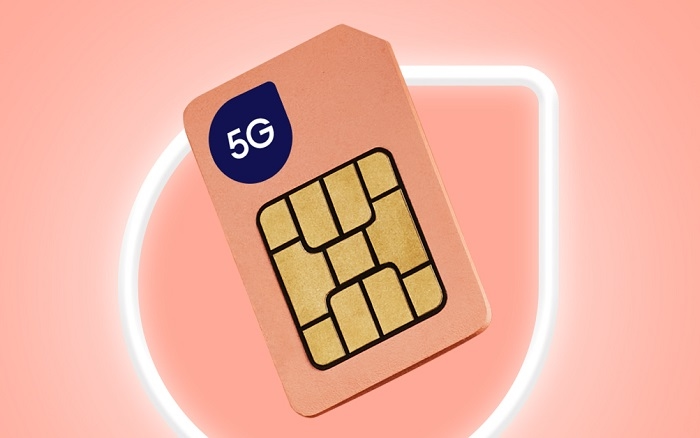
A 5G SIM card has special info inside. This info helps connect to new networks. The SIM doesn’t make things faster by itself. What it does is help your carrier know who you are. Then it lets you use their services.
A 5G-ready SIM lets your phone:
- connect to 5G networks
- use cool new features
- stay safe with better security
- get modern carrier stuff
Without the right SIM? Your phone might stick to old networks. Not fun.
Why Some SIM Cards Don’t Support 5G
Lots of people still use old SIM cards. Years old, even. That’s usually fine. But some SIMs came out before 5G was a thing. Way before.
These old SIMs might have problems with:
- signing into networks
- getting carrier updates
- new safety features
- fresh services
Carriers keep making things better. Sometimes they say “hey, get a new SIM.”
Check the Age of Your SIM Card
Want a quick check? Think about how old your SIM is.
Ask yourself these:
- Have I used this SIM for 5 years?
- Maybe 8 years?
- Did I get it before anyone talked about 5G?
Said yes? Your carrier might want you to upgrade. But wait. Old SIMs can still work sometimes. Many do just fine. It’s just that older ones might not do everything new ones can.
Look for a 5G Indicator on Your Phone
This test is super easy. Look at the top of your screen. See the signal bars?
You might see things like:
- 5G
- 5G+
- 5G UW
- 5G UC
- 5G SA
See these when using data? Nice! Your SIM probably works with 5G. But here’s the thing. This just shows everything’s working together. It doesn’t tell you exactly why it works.
Check Network Settings
New phones let you pick network types. Cool, right?
On most phones, you go to:
Settings → Mobile Network → Preferred Network Type
You might see choices like:
- 5G Auto
- 5G On
- 5G Preferred
- LTE/5G
Can you pick a 5G option? That’s good news! But remember, you still need other stuff to work too.
Verify That Your Phone Supports 5G

This catches lots of people off guard. A 5G SIM can’t make a non-5G phone use 5G. It just can’t.
The phone needs:
- 5G chips inside
- special antennas
- the right radio bands
People think their SIM is broken. But maybe their phone just can’t do 5G. Look up your phone online. Check what it can do.
Use Your Carrier’s Mobile App
Most phone companies have apps now. These apps show lots of info.
In the app, you might find:
- what kind of SIM you have
- if it works with new networks
- what services you can get
- if your phone is good to go
Some apps straight up tell you if 5G is turned on. Super helpful!
Contact Customer Support
Still not sure? Just call them.
Support folks can check:
- what type of SIM you have
- if it works with new stuff
- your account details
- if you can use 5G
They’ll need:
- your phone number
- account info
- maybe your SIM number
It takes just a few minutes. Then you’ll know for sure.
Visit a Carrier Store
Going to a store is still one of the best ways.
Store people can check:
- if your SIM works
- if your phone works
- your settings
- if 5G is around you
Need a new SIM? They can give you one right away. Easy!
Why Your Phone Shows LTE Instead of 5G
People see LTE and think their SIM is bad.
Not always true!
Here’s what might be happening:
Weak Coverage
5G isn’t everywhere yet. Your spot might have better LTE.
Indoor Signal Issues
Buildings block signals. Your phone picks LTE when it’s stronger.
Carrier Network Congestion
Sometimes the network picks LTE on purpose. Keeps things running smooth.
Incorrect Settings
Maybe you turned off 5G by mistake. Check your settings!
Unsupported Plan
Some carriers need special plans for 5G. Your SIM might be fine. Your plan might not be.
Signs Your SIM Might Need Replacement
Maybe get a new SIM if you see:
- network errors all the time
- your carrier saying “upgrade”
- no 5G options anywhere
- can’t activate stuff
- new services don’t work
These don’t always mean your SIM is bad. But they might mean it’s time for a new one.
Can eSIM Support 5G?
You bet!
Lots of new phones use eSIM now.
An eSIM is like a regular SIM. But it’s built into your phone.
Carriers offer:
- 5G regular SIMs
- 5G eSIM profiles
Both work the same. Both get the same speeds.
Does a New SIM Automatically Give You 5G?
Nope.
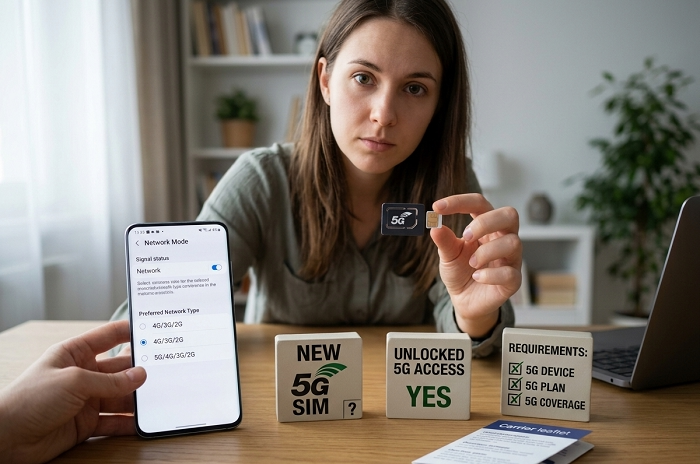
This tricks lots of people. A new SIM alone won’t get you 5G.
You still need:
- a phone that does 5G
- carrier support for it
- the right plan
- 5G towers near you
All four need to work together. Like a team!
Can a Speed Test Confirm a 5G SIM?
Not really. Fast speeds don’t prove you’re on 5G. Good LTE can be super fast too. Slow speeds don’t mean no 5G either. Maybe the 5G signal is just weak. Speed tests help. But they don’t tell the whole story.
Travelers and 5G Compatibility
Going somewhere? Using local SIMs?
Before buying, check:
- does the SIM do 5G?
- does your phone work there?
- does that carrier have 5G?
Most travel SIMs do 5G now. Which is nice!
Common Myths About 5G SIM Cards
“Every SIM Card Supports 5G”
Not true. Some old ones need replacing.
“A New SIM Makes My Phone Faster”
Only if other stuff works too.
“5G Works Everywhere”
Nah. Coverage is still spotty in places.
“You Need a New Phone Number”
Almost never! They just move your old number over.
Quick Checklist
Here’s how to know if your SIM can do 5G:
✓ Your phone does 5G
✓ Your carrier has 5G
✓ Your plan includes 5G
✓ You’re in a 5G area
✓ Your phone shows 5G
✓ Your carrier says your SIM is good
Got all six? Your SIM is ready for 5G!
FAQs
How can I tell if my SIM supports 5G?
Check your carrier app. Look at phone settings. Or just call them!
Do all new SIM cards support 5G?
Most do. But ask your carrier to be sure.
Can an old SIM card still work with 5G?
Some can. Others need to be swapped out.
Does a 5G phone guarantee 5G service?
Nope. You need the right SIM, plan, and coverage too.
Can eSIM use 5G networks?
Yep! Many eSIMs do 5G just fine.
Why does my phone only show LTE?
Could be coverage. Or settings. Or plan limits. Lots of reasons!
Will upgrading my SIM change my number?
Usually not. They just move your number to the new SIM.
Is SIM replacement expensive?
Most carriers do it cheaply. Or even free!
Finding out if your SIM does 5G? It’s easier than you think.
Just check your:
- phone specs
- how old your SIM is
- carrier settings
- what plan you have
- local coverage
Lots of times, your SIM already works with 5G. Sweet! If not? Carriers can swap it fast. You keep your number too. 5G keeps growing in 2026. Making sure your SIM works with it? That’s one easy way to get the best from your phone.